 APK FET
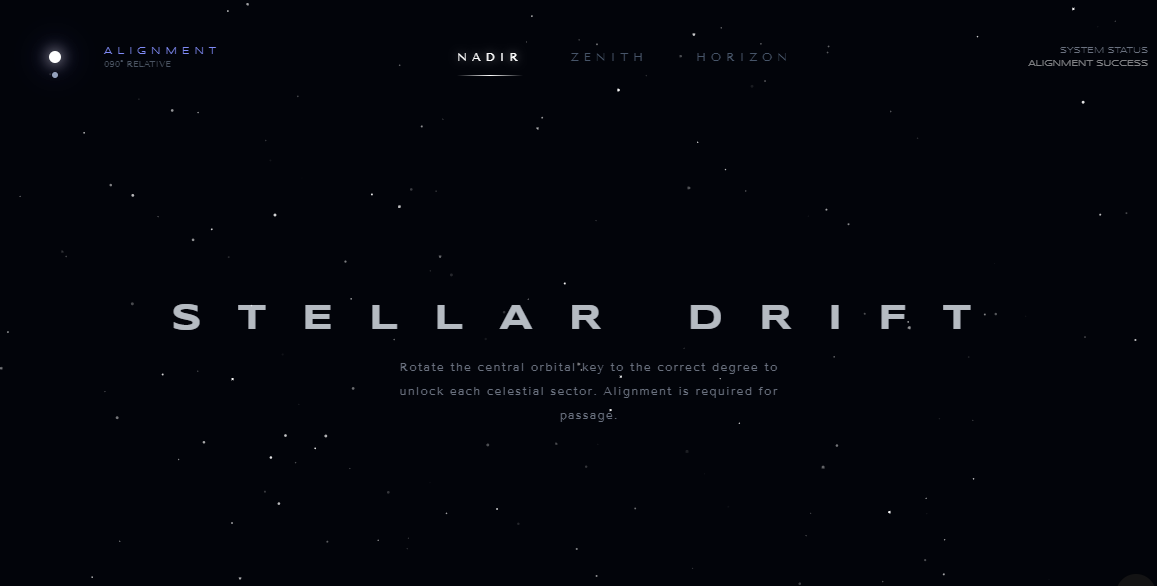
The Celestial Alignment navbar is an interactive, space-themed interface that blends minimalist "Space-Age" aesthetics with an orientation-based puzzle. It replaces standard navigation with a system of orbital mechanics and coordinate alignment.
Key Features
The Orbital Key (Interactive Logo): The logo functions as a cosmic dial. It consists of a central "Sun" (a high-glow anchor point) and a "Moon" that orbits it. Each click on the system rotates the moon by exactly 90 degrees, updating a real-time degree counter (000° RELATIVE).
Alignment-Based Navigation: The menu links (Nadir, Zenith, and Horizon) are initially dormant. To activate them, the user must physically rotate the Orbital Key to match the link's specific hidden coordinate:
Nadir requires a 90° alignment.
Zenith requires a 180° alignment.
Horizon requires a 270° alignment.
Feedback & Validation: The system provides immediate mechanical feedback. A correct alignment triggers an "ALIGNMENT SUCCESS" message and a permanent glow on the text, while an incorrect attempt causes the link to flash red and displays a "DEVIATION DETECTED" warning.
Procedural Starfield: The entire background is a dynamic HTML5 Canvas simulation. It generates hundreds of unique stars with varying opacities and sizes that drift slowly upward, creating a sense of constant, peaceful motion.
The Gateway Reveal: Once all three sectors are successfully aligned, the "System Status" shifts to "GATEWAY READY" and a central constellation map fades into view, signaling the completion of the puzzle.
Design Aesthetic
The interface uses a High-Contrast Astral palette, featuring deep obsidian backgrounds (#02040a), indigo accents, and pure white glows. The typography utilizes the wide, cinematic Syncopate font for technical headings and the elegant Tenor Sans for body text, creating a sophisticated, futuristic atmosphere.
<!DOCTYPE html>
<html lang="en">
<head>
    <meta charset="UTF-8">
    <meta name="viewport" content="width=device-width, initial-scale=1.0">
    <title>Celestial Alignment Nav</title>
    <script src="https://cdn.tailwindcss.com"></script>
    <style>
        @import url('https://fonts.googleapis.com/css2?family=Syncopate:wght@400;700&family=Tenor+Sans&display=swap');

        :root {
            --star-color: #fff;
        }

        body {
            background-color: #02040a;
            color: #e2e8f0;
            font-family: 'Tenor Sans', sans-serif;
            overflow: hidden;
            height: 100vh;
        }

        .syncopate {
            font-family: 'Syncopate', sans-serif;
        }

        /* Celestial Bodies */
        .orbit-container {
            position: relative;
            width: 50px;
            height: 50px;
            display: flex;
            align-items: center;
            justify-content: center;
        }

        .planet {
            position: absolute;
            border-radius: 50%;
            transition: all 0.8s cubic-bezier(0.4, 0, 0.2, 1);
            cursor: pointer;
        }

        .sun {
            width: 12px;
            height: 12px;
            background: #fff;
            box-shadow: 0 0 15px #fff, 0 0 30px #4f46e5;
            z-index: 10;
        }

        .moon {
            width: 6px;
            height: 6px;
            background: #94a3b8;
            transform: translate(18px, 0);
        }

        /* Nav Link Styles */
        .stellar-link {
            position: relative;
            font-size: 0.75rem;
            letter-spacing: 0.4em;
            text-transform: uppercase;
            transition: color 0.5s;
            color: #475569;
        }

        .stellar-link.active {
            color: #fff;
            text-shadow: 0 0 10px rgba(255,255,255,0.5);
        }

        .stellar-link::after {
            content: '';
            position: absolute;
            bottom: -10px;
            left: 0;
            width: 0;
            height: 1px;
            background: linear-gradient(90deg, transparent, #fff, transparent);
            transition: width 0.5s ease;
        }

        .stellar-link.active::after {
            width: 100%;
        }

        /* Background Stars */
        #stars-canvas {
            position: fixed;
            top: 0;
            left: 0;
            z-index: -1;
        }

        .constellation-map {
            border: 1px solid rgba(255,255,255,0.05);
            background: rgba(255,255,255,0.02);
            backdrop-filter: blur(5px);
        }

        @keyframes drift {
            0% { transform: translateY(0px); }
            50% { transform: translateY(-5px); }
            100% { transform: translateY(0px); }
        }

        .drift {
            animation: drift 4s infinite ease-in-out;
        }
    </style>
</head>
<body>

    <canvas id="stars-canvas"></canvas>

    <nav class="fixed top-0 w-full p-8 flex items-center justify-between z-50">
        <!-- The Orbital Key -->
        <div class="flex items-center space-x-6">
            <div class="orbit-container" id="orbital-key" onclick="rotateSystem()">
                <div class="planet sun"></div>
                <div class="planet moon" id="moon-body"></div>
            </div>
            <div class="flex flex-col">
                <span class="syncopate text-[10px] tracking-[0.5em] text-indigo-400">ALIGNMENT</span>
                <span id="angle-display" class="text-[9px] text-gray-600">000° RELATIVE</span>
            </div>
        </div>

        <!-- The Constellation Links -->
        <div class="flex space-x-12">
            <button onclick="checkAlignment(90, 'link-1')" id="link-1" class="stellar-link">Nadir</button>
            <button onclick="checkAlignment(180, 'link-2')" id="link-2" class="stellar-link">Zenith</button>
            <button onclick="checkAlignment(270, 'link-3')" id="link-3" class="stellar-link">Horizon</button>
        </div>

        <!-- The Phase Tracker -->
        <div class="syncopate text-[9px] text-gray-500 text-right">
            <div>SYSTEM STATUS</div>
            <div id="status-msg" class="text-white opacity-50">DORMANT</div>
        </div>
    </nav>

    <main class="flex flex-col items-center justify-center min-h-screen text-center px-4">
        <div class="drift">
            <h1 class="syncopate text-2xl md:text-4xl font-bold tracking-[1em] mb-4 opacity-80" id="main-title">
                STELLAR DRIFT
            </h1>
            <p class="text-gray-500 max-w-sm mx-auto text-xs tracking-widest leading-loose">
                Rotate the central orbital key to the correct degree to unlock each celestial sector.
                Alignment is required for passage.
            </p>
        </div>

        <div id="unlock-card" class="hidden mt-12 p-12 constellation-map rounded-full w-64 h-64 flex flex-col items-center justify-center animate-in fade-in zoom-in duration-1000">
            <div class="text-indigo-400 text-3xl mb-4">✧</div>
            <p class="syncopate text-[10px] tracking-widest">GATEWAY OPENED</p>
            <p class="mt-4 text-[9px] text-gray-400 uppercase">You have found the true path through the stars.</p>
        </div>
    </main>

    <script>
        let currentRotation = 0;
        let unlockedPaths = { 'link-1': false, 'link-2': false, 'link-3': false };

        function rotateSystem() {
            currentRotation = (currentRotation + 90) % 360;
            const moon = document.getElementById('moon-body');
            const angleDisplay = document.getElementById('angle-display');

            moon.style.transform = `rotate(${currentRotation}deg) translate(18px, 0) rotate(-${currentRotation}deg)`;
            angleDisplay.innerText = `${String(currentRotation).padStart(3, '0')}° RELATIVE`;

            // Subtle glow on rotation
            document.querySelector('.sun').style.boxShadow = `0 0 25px #fff, 0 0 50px #4f46e5`;
            setTimeout(() => {
                document.querySelector('.sun').style.boxShadow = `0 0 15px #fff, 0 0 30px #4f46e5`;
            }, 300);
        }

        function checkAlignment(targetAngle, linkId) {
            const statusMsg = document.getElementById('status-msg');
            const link = document.getElementById(linkId);

            if (currentRotation === targetAngle) {
                unlockedPaths[linkId] = true;
                link.classList.add('active');
                statusMsg.innerText = "ALIGNMENT SUCCESS";
                statusMsg.classList.add('text-indigo-400');

                checkVictory();
            } else {
                statusMsg.innerText = "DEVIATION DETECTED";
                statusMsg.classList.remove('text-indigo-400');
                link.classList.add('text-red-900');
                setTimeout(() => link.classList.remove('text-red-900'), 500);
            }
        }

        function checkVictory() {
            if (Object.values(unlockedPaths).every(v => v === true)) {
                document.getElementById('status-msg').innerText = "GATEWAY READY";
                document.getElementById('main-title').innerText = "THE VOID OPENS";
                document.getElementById('unlock-card').classList.remove('hidden');
            }
        }

        // Starfield Background
        const canvas = document.getElementById('stars-canvas');
        const ctx = canvas.getContext('2d');
        let stars = [];

        function initStars() {
            canvas.width = window.innerWidth;
            canvas.height = window.innerHeight;
            stars = [];
            for (let i = 0; i < 200; i++) {
                stars.push({
                    x: Math.random() * canvas.width,
                    y: Math.random() * canvas.height,
                    size: Math.random() * 1.5,
                    opacity: Math.random(),
                    speed: Math.random() * 0.05
                });
            }
        }

        function drawStars() {
            ctx.clearRect(0, 0, canvas.width, canvas.height);
            stars.forEach(star => {
                ctx.fillStyle = `rgba(255, 255, 255, ${star.opacity})`;
                ctx.beginPath();
                ctx.arc(star.x, star.y, star.size, 0, Math.PI * 2);
                ctx.fill();

                star.y -= star.speed;
                if (star.y < 0) star.y = canvas.height;
            });
            requestAnimationFrame(drawStars);
        }

        window.addEventListener('resize', initStars);
        initStars();
        drawStars();
    </script>
</body>
</html>