 APK FET
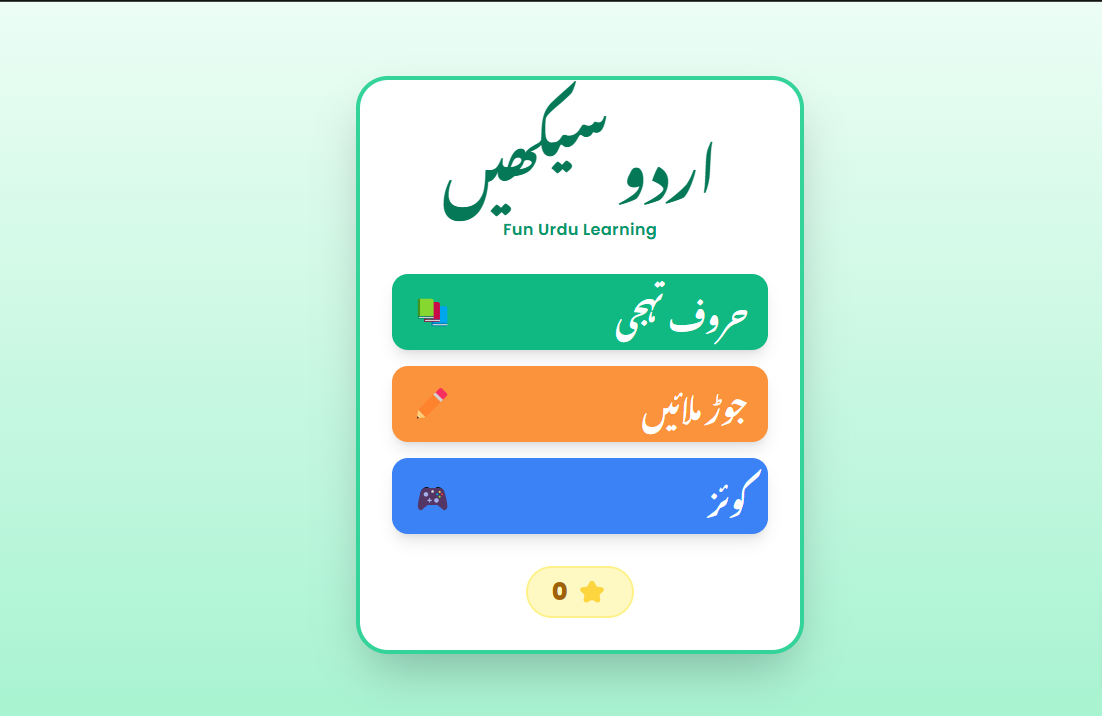
Urdu Kids Learning App (اردو سیکھیں)
A vibrant, interactive, and educational web application designed to introduce children to the Urdu alphabet through multisensory engagement. This app combines visual cues, native audio pronunciation, and gamified challenges to make learning Urdu intuitive and fun.
🌟 Key Features
1. Alphabet Discovery (حروف تہجی)
Visual Learning: Each letter is presented with high-quality emojis and large, clear Nastaliq script.
Phonetic Reinforcement: Real-time audio pronunciation for every letter and associated object (e.g., "Alif say Angoor").
Interactive UI: Smooth transitions and color-coded backgrounds that change with each letter to keep children engaged.
2. Matching Game (جوڑ ملائیں)
Cognitive Development: A drag-and-drop "line drawing" interface where children match Urdu letters to their corresponding visual icons.
Touch-Optimized: Designed specifically for tablets and smartphones with fluid canvas animations.
Positive Feedback: Instant audio praise for correct matches to build confidence.
3. Interactive Quiz (کوئز ٹائم)
Recognition Skills: Challenges the child to identify the correct object starting with a specific letter.
Star Reward System: A motivational point system that tracks progress and encourages repetitive learning.
🛠 Technical Excellence
Robust Audio System
The app features a sophisticated Text-to-Speech (TTS) integration with the Gemini API. To ensure a seamless experience, we implemented:
Exponential Backoff: Automatically retries audio requests in case of network instability, preventing "Unexpected end of input" errors.
PCM to WAV Conversion: Real-time client-side audio processing to ensure compatibility across all modern browsers.
Smart Caching: Pre-loads upcoming sounds to eliminate playback lag.
Responsive & Accessible Design
Single-File Architecture: Built as a high-performance single-file web app for easy deployment.
Tailwind CSS Styling: Uses a modern, "bubbly" UI aesthetic with rounded corners and soft shadows, tailored for children.
RTL Support: Fully optimized for Right-to-Left (RTL) reading patterns essential for the Urdu language.
🎯 Educational Goals
Build foundational literacy in Urdu.
Improve hand-eye coordination through the matching interface.
Foster an early love for the Urdu language through gamification.
<!DOCTYPE html>
<html lang="ur" dir="rtl">
<head>
<meta charset="UTF-8">
<meta name="viewport" content="width=device-width, initial-scale=1.0, maximum-scale=1.0, user-scalable=no">
<title>اردو سیکھیں - Urdu Learning App</title>
<script src="https://cdn.tailwindcss.com"></script>
<link href="https://fonts.googleapis.com/css2?family=Noto+Nastaliq+Urdu:wght@400;700&family=Poppins:wght@400;600;800&display=swap" rel="stylesheet">
<style>
:root {
--primary: #10b981;
--secondary: #fb923c;
--accent: #3b82f6;
}
body {
font-family: 'Poppins', 'Noto Nastaliq Urdu', serif;
touch-action: manipulation;
overflow: hidden;
background-color: #f0fdf4;
-webkit-tap-highlight-color: transparent;
}
.urdu-text { font-family: 'Noto Nastaliq Urdu', serif; }
.canvas-container { touch-action: none; position: relative; }
.card-bounce { animation: bounce 2s infinite; }
@keyframes bounce {
0%, 100% { transform: translateY(0); }
50% { transform: translateY(-10px); }
}
.screen { display: none; height: 100vh; width: 100vw; }
.screen.active { display: flex; flex-direction: column; }
#match-canvas {
position: absolute;
top: 0;
left: 0;
width: 100%;
height: 100%;
pointer-events: none;
z-index: 10;
}
.node-active { transform: scale(1.1); border-color: #fb923c !important; box-shadow: 0 0 15px rgba(251, 146, 60, 0.5); }
.fade-in { animation: fadeIn 0.3s ease-in; }
@keyframes fadeIn { from { opacity: 0; } to { opacity: 1; } }
</style>
</head>
<body class="bg-emerald-50 text-gray-800">
<!-- Main Menu -->
<section id="menu-screen" class="screen active items-center justify-center p-6 bg-gradient-to-b from-emerald-50 to-emerald-200">
<div class="bg-white p-8 rounded-[2rem] shadow-2xl text-center max-w-md w-full border-4 border-emerald-400 fade-in">
<h1 class="text-6xl font-bold text-emerald-700 mb-2 urdu-text leading-relaxed">اردو سیکھیں</h1>
<p class="text-emerald-600 mb-8 font-semibold tracking-wide">Fun Urdu Learning</p>
<div class="space-y-4">
<button onclick="showScreen('alphabet')" class="w-full flex items-center justify-between p-5 bg-emerald-500 hover:bg-emerald-600 text-white rounded-2xl transition-all shadow-lg group">
<span class="text-3xl font-bold urdu-text">حروف تہجی</span>
<span class="text-3xl group-hover:rotate-12 transition-transform">📚</span>
</button>
<button onclick="showScreen('matching')" class="w-full flex items-center justify-between p-5 bg-orange-400 hover:bg-orange-500 text-white rounded-2xl transition-all shadow-lg group">
<span class="text-3xl font-bold urdu-text">جوڑ ملائیں</span>
<span class="text-3xl group-hover:rotate-12 transition-transform">✏️</span>
</button>
<button onclick="showScreen('quiz')" class="w-full flex items-center justify-between p-5 bg-blue-500 hover:bg-blue-600 text-white rounded-2xl transition-all shadow-lg group">
<span class="text-3xl font-bold urdu-text">کوئز</span>
<span class="text-3xl group-hover:rotate-12 transition-transform">🎮</span>
</button>
</div>
<div class="mt-8 flex items-center justify-center gap-2 bg-yellow-100 py-2 px-6 rounded-full w-fit mx-auto border-2 border-yellow-200">
<span class="text-2xl text-yellow-500">⭐</span>
<span id="star-count" class="text-2xl font-black text-yellow-700">0</span>
</div>
</div>
</section>
<!-- Alphabet Learning -->
<section id="alphabet-screen" class="screen p-4">
<header class="flex justify-between items-center mb-4">
<button onclick="showScreen('menu')" class="p-3 bg-white rounded-2xl shadow text-emerald-600 text-2xl">🔙</button>
<h2 class="text-3xl font-bold text-emerald-800 urdu-text">حروف تہجی</h2>
<div class="w-12"></div>
</header>
<div class="flex-grow flex flex-col items-center justify-center max-w-lg mx-auto w-full fade-in">
<div class="bg-white w-full rounded-[2.5rem] shadow-2xl overflow-hidden border-8 border-white flex flex-col">
<div id="alpha-color-bg" class="bg-emerald-500 p-12 text-center text-white relative flex-grow flex items-center justify-center transition-colors duration-500">
<h1 id="alpha-char" class="text-[10rem] font-bold urdu-text leading-none drop-shadow-lg">ا</h1>
<button onclick="playAlphabetSound()" class="absolute bottom-6 right-6 p-4 bg-white/30 hover:bg-white/50 rounded-full transition-colors backdrop-blur-sm">
<span class="text-3xl">🔊</span>
</button>
</div>
<div class="p-8 text-center bg-white flex flex-col items-center">
<div id="alpha-emoji" class="text-8xl mb-4 card-bounce">🍇</div>
<h3 id="alpha-object" class="text-5xl font-bold text-gray-800 mb-1 urdu-text">انگور</h3>
<p id="alpha-english" class="text-xl text-gray-400 font-bold uppercase tracking-widest">Grapes</p>
</div>
</div>
<div class="flex gap-4 mt-8 w-full">
<button onclick="changeAlpha(-1)" class="flex-1 py-5 bg-gray-200 rounded-2xl text-2xl font-bold text-gray-700 urdu-text transition-transform active:scale-95">پچھلا</button>
<button onclick="changeAlpha(1)" class="flex-1 py-5 bg-emerald-500 text-white rounded-2xl text-2xl font-bold shadow-lg urdu-text transition-transform active:scale-95">اگلا</button>
</div>
</div>
</section>
<!-- Matching Game -->
<section id="matching-screen" class="screen p-4 bg-orange-50">
<header class="flex justify-between items-center mb-4">
<button onclick="showScreen('menu')" class="p-3 bg-white rounded-2xl shadow text-orange-600 text-2xl">🔙</button>
<h2 class="text-3xl font-bold text-orange-800 urdu-text">حروف ملائیں</h2>
<div class="w-12"></div>
</header>
<div class="flex-grow flex flex-col items-center justify-center max-w-3xl mx-auto w-full fade-in">
<div class="relative w-full h-[70vh] canvas-container bg-white/50 rounded-3xl p-4 flex justify-between items-stretch">
<canvas id="match-canvas"></canvas>
<div id="match-left" class="flex flex-col justify-around w-1/4 z-20"></div>
<div id="match-right" class="flex flex-col justify-around w-1/4 z-20"></div>
</div>
<p class="text-center text-orange-700 font-bold urdu-text mt-4 text-xl">صحیح تصویر کو ملائیں!</p>
</div>
</section>
<!-- Quiz Game -->
<section id="quiz-screen" class="screen p-4 bg-blue-50">
<header class="flex justify-between items-center mb-6">
<button onclick="showScreen('menu')" class="p-3 bg-white rounded-2xl shadow text-blue-600 text-2xl">🔙</button>
<h2 class="text-3xl font-bold text-blue-800 urdu-text">کوئز ٹائم</h2>
<div class="w-12"></div>
</header>
<div class="flex-grow flex flex-col items-center justify-center w-full max-w-md mx-auto fade-in">
<div class="bg-white p-10 rounded-[2.5rem] shadow-xl border-b-8 border-blue-200 text-center mb-8 w-full">
<p class="text-lg text-blue-400 font-black mb-2 urdu-text tracking-widest">تلاش کریں</p>
<h1 id="quiz-char" class="text-[8rem] font-bold text-gray-800 urdu-text">ب</h1>
</div>
<div id="quiz-options" class="grid grid-cols-2 gap-4 w-full"></div>
</div>
</section>
<script>
const apiKey = "";
let stars = 0;
let currentAlphaIndex = 0;
const alphabet = [
{ char: 'ا', name: 'Alif', object: 'انگور', english: 'Grapes', emoji: '🍇', color: '#10b981' },
{ char: 'ب', name: 'Bey', object: 'بکری', english: 'Goat', emoji: '🐐', color: '#3b82f6' },
{ char: 'پ', name: 'Pey', object: 'پنکھا', english: 'Fan', emoji: '🌀', color: '#f59e0b' },
{ char: 'ت', name: 'Tey', object: 'تتلی', english: 'Butterfly', emoji: '🦋', color: '#ec4899' },
{ char: 'ٹ', name: 'Teey', object: 'ٹماٹر', english: 'Tomato', emoji: '🍅', color: '#ef4444' },
{ char: 'ج', name: 'Jeem', object: 'جہاز', english: 'Aeroplane', emoji: '✈️', color: '#6366f1' },
{ char: 'چ', name: 'Chey', object: 'چاند', english: 'Moon', emoji: '🌙', color: '#8b5cf6' },
{ char: 'د', name: 'Daal', object: 'درخت', english: 'Tree', emoji: '🌳', color: '#10b981' },
{ char: 'ش', name: 'Sheen', object: 'شیر', english: 'Lion', emoji: '🦁', color: '#f97316' },
{ char: 'م', name: 'Meem', object: 'مچھلی', english: 'Fish', emoji: '🐟', color: '#06b6d4' }
];
/**
* Robust Audio System with Exponential Backoff
*/
const AudioSystem = {
cache: new Map(),
currentAudio: null,
preloading: new Set(),
async getAudioWithRetry(text, retries = 5, delay = 1000) {
try {
const response = await fetch(`https://generativelanguage.googleapis.com/v1beta/models/gemini-2.5-flash-preview-tts:generateContent?key=${apiKey}`, {
method: 'POST',
headers: { 'Content-Type': 'application/json' },
body: JSON.stringify({
contents: [{ parts: [{ text: text }] }],
generationConfig: {
responseModalities: ["AUDIO"],
speechConfig: { voiceConfig: { prebuiltVoiceConfig: { voiceName: "Kore" } } }
},
model: "gemini-2.5-flash-preview-tts"
})
});
if (!response.ok) throw new Error(`HTTP ${response.status}`);
const data = await response.json();
const base64 = data.candidates?.[0]?.content?.parts?.[0]?.inlineData?.data;
if (!base64) throw new Error("Empty Response Body");
const bin = atob(base64);
const arr = new Uint8Array(bin.length);
for (let i = 0; i < bin.length; i++) arr[i] = bin.charCodeAt(i);
const pcmBlob = new Blob([arr], { type: 'audio/l16' });
const wavBlob = await this.pcmToWav(pcmBlob, 24000);
const url = URL.createObjectURL(wavBlob);
return url;
} catch (e) {
if (retries > 0) {
await new Promise(r => setTimeout(r, delay));
return this.getAudioWithRetry(text, retries - 1, delay * 2);
}
throw e;
}
},
async getAudioBlob(text) {
if (this.cache.has(text)) return this.cache.get(text);
if (this.preloading.has(text)) {
while (this.preloading.has(text)) {
await new Promise(r => setTimeout(r, 100));
}
return this.cache.get(text);
}
this.preloading.add(text);
try {
const url = await this.getAudioWithRetry(`Say clearly: ${text}`);
this.cache.set(text, url);
return url;
} catch (e) {
// Silently fail to not block the UI
return null;
} finally {
this.preloading.delete(text);
}
},
async play(text) {
if (this.currentAudio) {
this.currentAudio.pause();
this.currentAudio.currentTime = 0;
}
const url = await this.getAudioBlob(text);
if (url) {
this.currentAudio = new Audio(url);
this.currentAudio.play().catch(e => console.log("Playback blocked"));
}
},
async pcmToWav(blob, rate) {
const buf = await blob.arrayBuffer();
const pcm = new Int16Array(buf);
const header = new ArrayBuffer(44);
const v = new DataView(header);
const s = (offset, str) => { for (let i = 0; i < str.length; i++) v.setUint8(offset + i, str.charCodeAt(i)); };
s(0, 'RIFF'); v.setUint32(4, 36 + pcm.length * 2, true); s(8, 'WAVE'); s(12, 'fmt '); v.setUint32(16, 16, true);
v.setUint16(20, 1, true); v.setUint16(22, 1, true); v.setUint32(24, rate, true); v.setUint32(28, rate * 2, true);
v.setUint16(32, 2, true); v.setUint16(34, 16, true); s(36, 'data'); v.setUint32(40, pcm.length * 2, true);
return new Blob([header, pcm], { type: 'audio/wav' });
}
};
function showScreen(id) {
document.querySelectorAll('.screen').forEach(s => s.classList.remove('active'));
document.getElementById(`${id}-screen`).classList.add('active');
if (id === 'alphabet') updateAlphabetUI();
if (id === 'matching') initMatchingGame();
if (id === 'quiz') initQuiz();
}
function updateAlphabetUI() {
const item = alphabet[currentAlphaIndex];
document.getElementById('alpha-char').innerText = item.char;
document.getElementById('alpha-object').innerText = item.object;
document.getElementById('alpha-emoji').innerText = item.emoji;
document.getElementById('alpha-english').innerText = item.english;
document.getElementById('alpha-color-bg').style.backgroundColor = item.color;
const phrase = `${item.name}. ${item.char} سے ${item.object}`;
AudioSystem.play(phrase);
const next = alphabet[(currentAlphaIndex + 1) % alphabet.length];
const prev = alphabet[(currentAlphaIndex - 1 + alphabet.length) % alphabet.length];
AudioSystem.getAudioBlob(`${next.name}. ${next.char} سے ${next.object}`);
AudioSystem.getAudioBlob(`${prev.name}. ${prev.char} سے ${prev.object}`);
}
function changeAlpha(dir) {
currentAlphaIndex = (currentAlphaIndex + dir + alphabet.length) % alphabet.length;
updateAlphabetUI();
}
function playAlphabetSound() {
const item = alphabet[currentAlphaIndex];
AudioSystem.play(`${item.name}. ${item.char} سے ${item.object}`);
}
let matchState = { drawing: false, startNode: null, pairs: [] };
function initMatchingGame() {
AudioSystem.play("حروف کو صحیح تصویر سے ملائیں۔");
const shuffled = [...alphabet].sort(() => 0.5 - Math.random()).slice(0, 4);
const leftNodes = [...shuffled].sort(() => 0.5 - Math.random());
const rightNodes = [...shuffled].sort(() => 0.5 - Math.random());
const leftContainer = document.getElementById('match-left');
const rightContainer = document.getElementById('match-right');
const canvas = document.getElementById('match-canvas');
canvas.width = canvas.parentElement.clientWidth;
canvas.height = canvas.parentElement.clientHeight;
leftContainer.innerHTML = '';
rightContainer.innerHTML = '';
matchState.pairs = [];
leftNodes.forEach(item => {
const el = document.createElement('div');
el.className = "w-20 h-20 flex items-center justify-center bg-white rounded-2xl shadow-md border-4 border-white text-4xl font-bold urdu-text cursor-pointer transition-all active:scale-95 touch-none z-30";
el.innerText = item.char;
el.dataset.char = item.char;
el.dataset.side = 'left';
addMatchListeners(el);
leftContainer.appendChild(el);
});
rightNodes.forEach(item => {
const el = document.createElement('div');
el.className = "w-20 h-20 flex items-center justify-center bg-white rounded-2xl shadow-md border-4 border-white text-5xl cursor-pointer transition-all active:scale-95 touch-none z-30";
el.innerText = item.emoji;
el.dataset.char = item.char;
el.dataset.side = 'right';
addMatchListeners(el);
rightContainer.appendChild(el);
});
drawMatchLines();
}
function addMatchListeners(el) {
const onStart = (e) => {
if (el.classList.contains('opacity-50')) return;
matchState.drawing = true;
matchState.startNode = el;
el.classList.add('node-active');
};
const onMove = (e) => {
if (!matchState.drawing) return;
const pos = e.touches ? e.touches[0] : e;
const canvas = document.getElementById('match-canvas');
const rect = canvas.getBoundingClientRect();
drawMatchLines({ x: pos.clientX - rect.left, y: pos.clientY - rect.top });
};
const onEnd = (e) => {
if (!matchState.drawing) return;
const pos = e.changedTouches ? e.changedTouches[0] : e;
const target = document.elementFromPoint(pos.clientX, pos.clientY);
if (target && target.dataset.char && target.dataset.side !== matchState.startNode.dataset.side) {
if (target.dataset.char === matchState.startNode.dataset.char) {
matchState.pairs.push({ from: matchState.startNode, to: target });
stars += 5;
updateStars();
AudioSystem.play("زبردست! بالکل ٹھیک۔");
target.classList.add('opacity-50', 'pointer-events-none', 'border-green-400');
matchState.startNode.classList.add('opacity-50', 'pointer-events-none', 'border-green-400');
} else {
AudioSystem.play("دوبارہ کوشش کریں");
}
}
matchState.startNode.classList.remove('node-active');
matchState.drawing = false;
drawMatchLines();
if (matchState.pairs.length === 4) {
setTimeout(() => { AudioSystem.play("بہت اچھے!"); showScreen('menu'); }, 1500);
}
};
el.addEventListener('mousedown', onStart);
el.addEventListener('touchstart', onStart, { passive: false });
window.addEventListener('mousemove', onMove);
window.addEventListener('touchmove', onMove, { passive: false });
window.addEventListener('mouseup', onEnd);
window.addEventListener('touchend', onEnd);
}
function drawMatchLines(currentPos = null) {
const canvas = document.getElementById('match-canvas');
const ctx = canvas.getContext('2d');
const rect = canvas.getBoundingClientRect();
ctx.clearRect(0, 0, canvas.width, canvas.height);
ctx.strokeStyle = '#fb923c';
ctx.lineWidth = 5;
ctx.lineCap = 'round';
matchState.pairs.forEach(p => {
const r1 = p.from.getBoundingClientRect();
const r2 = p.to.getBoundingClientRect();
ctx.beginPath();
ctx.moveTo(r1.left + r1.width/2 - rect.left, r1.top + r1.height/2 - rect.top);
ctx.lineTo(r2.left + r2.width/2 - rect.left, r2.top + r2.height/2 - rect.top);
ctx.stroke();
});
if (matchState.drawing && currentPos) {
const r1 = matchState.startNode.getBoundingClientRect();
ctx.setLineDash([8, 8]);
ctx.beginPath();
ctx.moveTo(r1.left + r1.width/2 - rect.left, r1.top + r1.height/2 - rect.top);
ctx.lineTo(currentPos.x, currentPos.y);
ctx.stroke();
ctx.setLineDash([]);
}
}
function initQuiz() {
const correct = alphabet[Math.floor(Math.random() * alphabet.length)];
const others = alphabet.filter(a => a.char !== correct.char).sort(() => 0.5 - Math.random()).slice(0, 3);
const options = [...others, correct].sort(() => 0.5 - Math.random());
document.getElementById('quiz-char').innerText = correct.char;
const container = document.getElementById('quiz-options');
container.innerHTML = '';
options.forEach(opt => {
const btn = document.createElement('button');
btn.className = "p-5 bg-white rounded-[2rem] shadow-lg border-4 border-white flex flex-col items-center gap-2 transition-all active:scale-95";
btn.innerHTML = `<span class="text-6xl">${opt.emoji}</span><span class="text-xl font-bold text-gray-700 urdu-text">${opt.object}</span>`;
btn.onclick = () => {
if (opt.char === correct.char) {
btn.classList.add('border-green-500', 'bg-green-50');
stars += 10;
updateStars();
AudioSystem.play("شاباش! یہ درست جواب ہے۔");
setTimeout(initQuiz, 2000);
} else {
btn.classList.add('border-red-400', 'bg-red-50');
AudioSystem.play("دوبارہ کوشش کریں۔");
setTimeout(() => btn.classList.remove('border-red-400', 'bg-red-50'), 1000);
}
};
container.appendChild(btn);
});
AudioSystem.play(`${correct.char} سے کیا بنتا ہے؟`);
}
function updateStars() {
document.getElementById('star-count').innerText = stars;
}
window.onload = () => {
updateStars();
alphabet.slice(0, 3).forEach(item => {
AudioSystem.getAudioBlob(`${item.name}. ${item.char} سے ${item.object}`);
});
};
</script>
</body>
</html>